Process documentation that survives leadership changes
Your Head of Customer Success has given notice. Their replacement starts in three weeks and has thirty days to figure out what is broken about onboarding before churn spikes. They ask for "the source of truth on the CS playbook" and what they get is a Lucid file from a 2024 reorg, four Notion pages last edited eight months ago by someone who has also since left, and tribal knowledge in three Slack DMs. They ask which is current. The honest answer is "none of them, and also all of them, depending on the question." That answer is not a laziness problem — it is a tooling problem. None of those surfaces was built to be the source of truth for a workflow with multiple owners across a year.
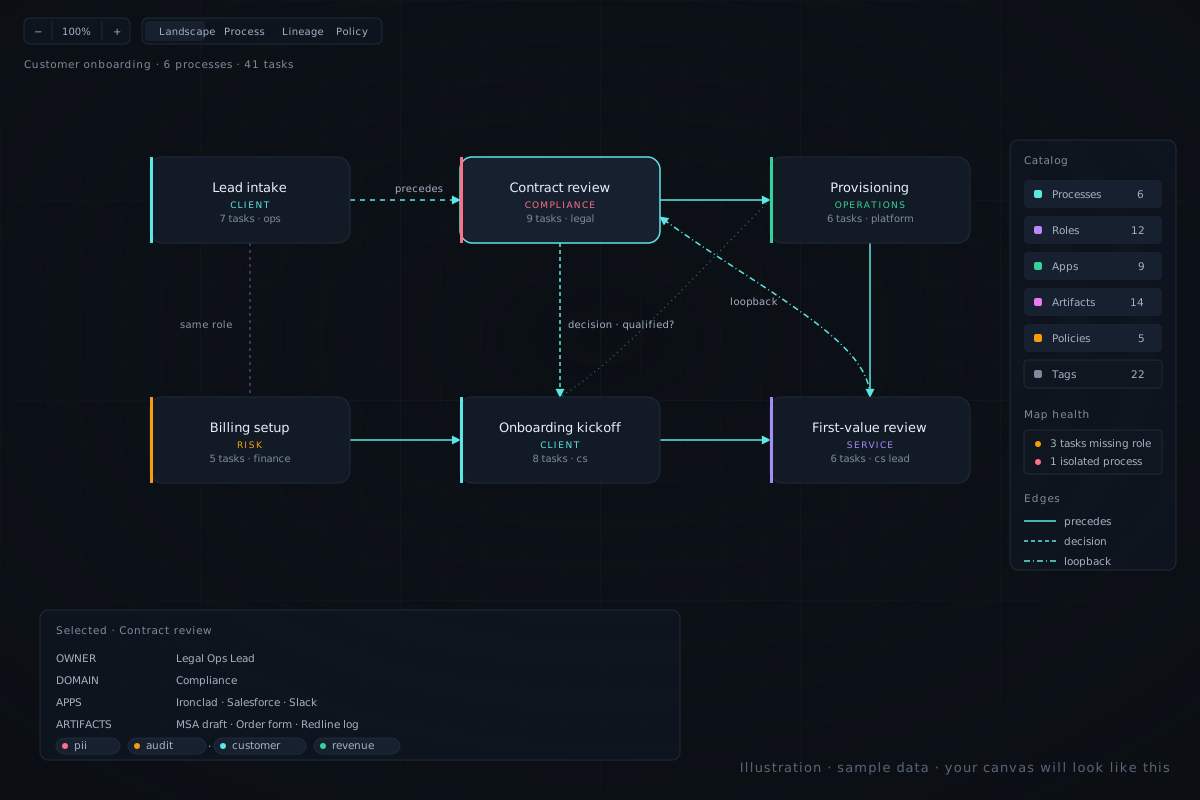
I have been on both ends of this — inheriting an ops function and finding the docs were a graveyard, and, earlier, being the person who built the docs and watched them rot the moment my attention moved on. Both experiences point at the same gap. This page is about why process docs die at SaaS-ops scale, what "survives" actually means as a design property, and the 90-day plan I would run walking into an ops leadership seat tomorrow.
The four ways docs die at this size
Between 50 and 200 employees, process documentation does not die from neglect. It dies from four specific structural failures, in this rough order of frequency.
1. The diagram drawer leaves
Someone — usually a contractor, a chief of staff, or the most diligent ops manager — spent two weeks making the canonical Lucid file. It was beautiful. It is now nine months stale because no one else feels ownership over a diagram they did not draw. When the drawer leaves, the file becomes a museum exhibit — interesting to look at, hazardous to act on.
2. The owner reorg
Six months ago "Customer Success Lead" owned the renewal workflow. After the reorg there is no CS Lead; the work is split across a Renewals Manager and a CS Operations Lead. The docs still reference the old role. Updating every document everywhere requires reading every document everywhere — which means it doesn't happen, and every "CS Lead" reference silently becomes a tripwire.
3. The new person does not know what is authoritative
There are three docs about onboarding. None of them says "this is the current one." The new hire reads all three, picks the longest one, and follows it. It happens to be the second-most out of date. Authority is kept in the heads of people who have been there longer than the docs have existed; when they leave, authority leaves with them.
4. The audit-pressure rewrite
SOC 2 prep arrives. Rather than fix the underlying brittleness, the team rewrites the docs from scratch in a new tool in two weeks, ships an artifact that is accurate on audit day, and starts decaying again the following Monday. Six months later the cycle repeats. The rewrite is the symptom that the surface was never one a working team could maintain between audits.
None of these is a discipline failure. All four are predictable consequences of using surfaces — diagram tools, wikis, Slack — that treat roles and processes as flat strings of text rather than as related entities. Strings don't update when an org chart changes. Relationships do.
What "survives" actually means
A process doc that survives leadership changes has three properties. They sound abstract; they are concrete consequences of how the underlying data is modelled.
Ownership is data, not memory
Every process and every step has a role assigned — not a person, a role. When the person holding that role moves, leaves, or gets promoted, the assignment moves with the role. Nobody can leave the company and orphan their docs, because the docs never pointed at them in the first place. The reorg case (#2 above) becomes a one-line edit on a role definition rather than a search-and-replace across a wiki.
The doc tells the new hire what is broken
A surviving doc surfaces its own gaps. Inline validation shows uncovered roles, processes without owners, and stale processes — so the new person doesn't have to guess which parts are current. The doc says "this process hasn't been touched in 180 days; this step has no owner; this role is referenced but undefined." That is the answer to "which of these is authoritative" — the doc itself, plus a list of the parts that aren't.
The doc is queryable across teams
A surviving doc lets a new ops leader ask "which processes does the new CS Lead inherit?" without reading every page. Or "which workflows does our refund policy govern?" These are day-one questions a new leader has and cannot answer from a wiki or a flat diagram. They require a data model that knows roles, processes, artifacts, and policies are different things with relationships between them — covered in detail on the SaaS-ops long-form page.
If you are inheriting an ops function and any of this resonates, the fastest way to see it is a 20-minute call. I'll model one of your real workflows live.
Book a 20-minute demoHow Process Map handles this
Four pieces of the product map directly to the four failure modes. None of these is roadmap; they are all shipped today.
Role-as-permissions. The role layer is also the permissions model. When you change an org chart — split a role, merge two, retire a function — the process map updates structurally. You don't run a doc-update sprint; the relationships do the work, because every task pointed at the role and the role definition is the single place that needs changing.
Map Health. A dashboard at /app/health surfacing the rot before it bites — stale processes, coverage gaps, processes without an owning role, roles referenced but never defined. A new leader's first morning with the tool is fifteen minutes on Map Health and a list of the ten most embarrassing gaps.
Audit log. Every change to a process, role, or policy is recorded with who, when, and what changed. When someone asks "I thought our renewal flow required a CSM sign-off — who took that out?" you answer from the log instead of from memory. Shipped as part of the recent SP4.2 enterprise-readiness wave.
Per-process visibility. Sensitive workflows (compensation review, performance management, security incident response) can be scoped to specific roles without splitting them into a separate workspace. The org has one map; what a person sees depends on the role they hold. Mechanics on the SaaS-ops page and the Lucid comparison.
The 90-day plan for a new ops leader
If you are walking into an ops leadership seat — Head of Ops, Head of CS, Head of RevOps, Chief of Staff inheriting an ops portfolio — here is the plan I'd run with Process Map in your first quarter. It is not a template. It is how the tool is meant to be used.
This plan needs no buy-in but yours in week one. The cost of trying it is a free trial. The cost of not trying it is the next time someone leaves and "where is the source of truth?" still has no good answer.
Why a demo, not a trial
Most pages on this site point at the trial signup. This one doesn't. If you are reading this, you are probably upstream of a tool decision — feeling the pain, not yet evaluating vendors. A self-serve trial works once you know which of your processes you want to model first. Before that, twenty minutes with me is faster: I'll model one of your real workflows live, you'll see the layered angle in your context, and you can decide on the trial after with the benefit of having seen the tool against your own data. No deck, no discovery questionnaire — bring one workflow you've been meaning to document.