Map your roles, apps, and policies — not just boxes and arrows.

Process Map is the layered process map for 50–200 person SaaS ops teams. One canvas for the workflow, the people who own each step, the tools it runs on, and the policies that govern it — instead of three half-stale docs in three different apps.

Try free — no credit card See a demo →
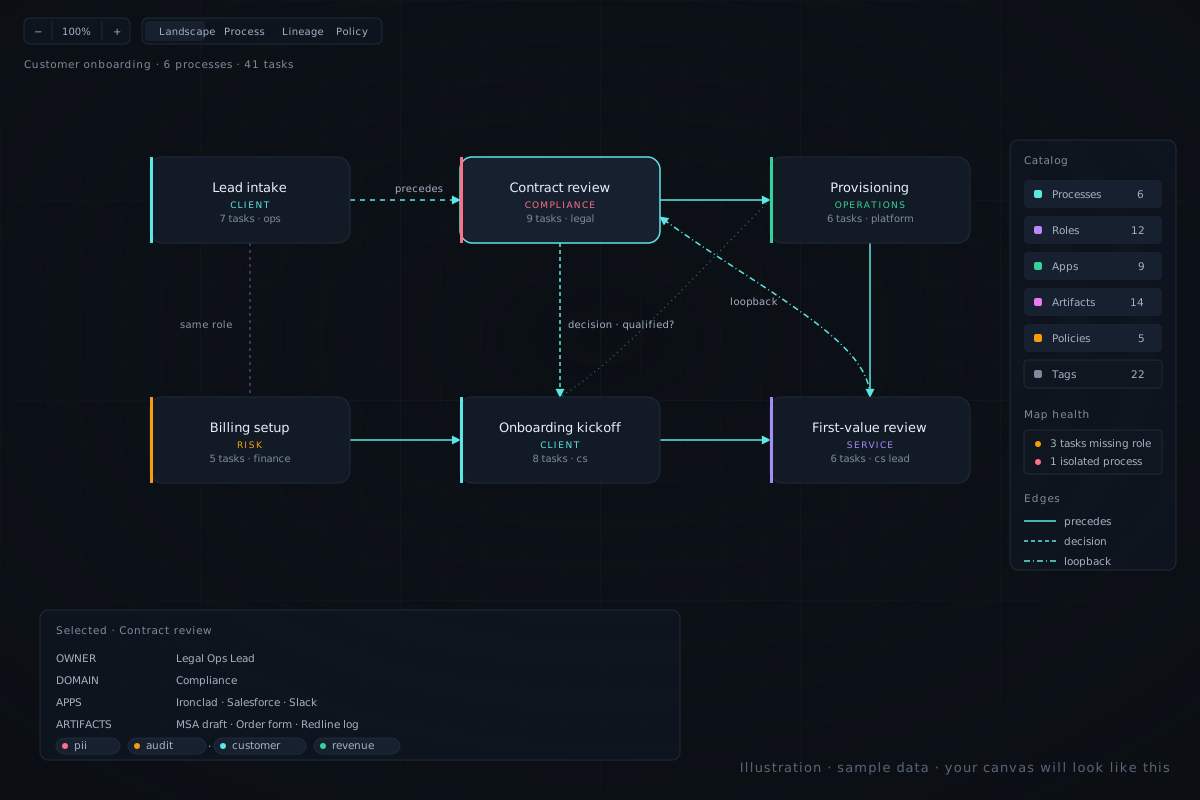
A layered process canvas illustration showing six process nodes connected by typed edges with role, application, artifact, and policy layers visible on the right rail

The Notion + Lucid + Slack-canvas problem.

If you run ops at a growing SaaS company, your processes probably live in three places at once: a Notion page nobody updates, a Lucidchart file someone made in 2024, and a Slack canvas that exists because the Notion page was already too out of date to fix. New hires onboard from whichever one HR happens to link them to. Audits surface contradictions. Nobody owns the gap.

The reason it stays broken is that none of those three tools were built for the job. Reviewers of the incumbents keep flagging the same things, in their own words.

Lucidchart and Miro: the diagram is "done", and then what?

Across G2 and Capterra, two complaints repeat: pricing escalates the moment you need real permissions, and large diagrams lag with multiple editors. The deeper problem is that the diagram ends where the work begins. There is no native concept of who owns a step, what tool it runs in, or which policy applies — so the picture and the operation drift apart within a quarter.

Notion: cheap and ubiquitous, but not a process tool.

Notion is great for narrative SOPs and bad for structured process modelling. There is no diagramming primitive, no role layer, no artifact lineage. Two teams document the same workflow on two pages and nothing reconciles them. By month six you have a "process docs" database with 80 entries and no idea which are still true.

Process Street and Tallyfy: SOPs without the picture.

Checklist tools handle the runtime well, but visual modelling is weak, conditional logic is limited, and analytics are shallow. Reviewers regularly ask for more pre-built templates and better reporting. You still need a diagram somewhere — it just lives in a different tool, maintained by a different person, on a different update cadence.

Bizagi and the BPMN suites: too heavy to land.

Capterra and TrustRadius reviewers describe Bizagi and similar BPMN suites as powerful but dated, slow to roll out, and gated behind enterprise sales cycles. Non-technical stakeholders bounce off the BPMN learning curve. Not a tool a 100-person company adopts in a quarter.
What Process Map does differently.

One canvas. Six layers on top of it. A health view that tells you what is actually broken. Self-serve from the first click — the differentiation is built into the model, not gated behind an enterprise tier.

Layered, not flat

Processes, tasks, roles, applications, artifacts, and policies are first-class entities — not stickers on top of a shape. Toggle a layer and see who shares a role across processes, or which app every team depends on. The canvas is the front door, not the entire product.

Inline validation as you build

The side panel flags tasks missing a role, isolated nodes, processes without a policy, and other gaps as you work — surfaced from the data you already entered. No separate spreadsheet, no audit ritual to schedule.

No BPMN nag

A modeller for people who do operations, not for people who passed BPMN certification. Rounded process cards, clipped edges, plain-English labels. New stakeholders get it in a meeting, not a training course.

Useful in 60 seconds

Sign up, click "Load sample data", and you are looking at a real org with multiple processes, dozens of tasks, and a populated role and policy layer. No demo call required to see what the product does.

Roles and RBAC that match your org

Define your own roles, assign them to processes and tasks, and use them to gate who can edit what. The role layer is also the permissions model — one source of truth for "who owns this", not two.

Pricing.

Free trial, no credit card. Two paid tiers when you are ready. Enterprise terms when your security team asks.

Free

$0 — no card required

No usage limits during beta. Demo mode for stakeholder previews (sample data, no login required).

Team

$12 / user / month

Billed annually once beta wraps. Free during beta. Custom roles, every layer, inline validation — the plan most ops teams will land on.

Business

$24 / user / month

Billed annually once beta wraps. Includes priority support and a roadmap to SSO + audit log + export.

Stop maintaining the same process in three tools.

Sign up, load the sample data, and have a real picture of your operation on screen in under five minutes. If it does not click in that first session, you have not lost anything but the click.

Try free — no credit card See a demo →